How to Segment a Developer Audience (Five Frameworks That Change Your Messaging)
Five practical frameworks to segment a developer audience: firmographic, role and seniority, stack and workflow stage, and pain intensity, grounded in live developer signal data.
 Alessio Persico Founder of EchoSift



What does it mean to target developers? A solo indie hacker shipping a weekend app and a platform engineer at a bank who has not touched application code in three years share the same job title. They read different docs, feel different pain, and buy in completely different ways. If your landing page speaks to both, it speaks to neither. Segmentation is the discipline of cutting one undifferentiated crowd into groups that behave alike, so that a single message can actually land.
This piece is about the cut itself, not about finding a niche or sizing demand. Those come before and after. Segmentation sits in the middle: you already know a pain exists and roughly how big it is, and now you need to decide which slice of the audience to build for first and how to talk to them. The frameworks below are five different ways to make that cut, each useful for a different decision.
The numbers used as worked examples are live aggregates from EchoSift’s signal feed, which continuously reads developer complaints and questions across GitHub, Stack Overflow, Hacker News, and Bluesky (4 sources) and groups them into recurring patterns. Nothing below is invented to make a point. Here is the feed on the snapshot date.
Why “developers” is not a segment
A segment is a group whose members respond to the same message and buy for the same reason. The word “developer” fails that test badly. What makes two developers alike is rarely the fact that they both write code. It is that they share a workflow, a stack, a seniority, a company shape, or a specific unmet need. Those are the real seams, and each one gives you a different way to divide the crowd.
Steve Blank’s first principle of a startup is that you do not have one customer, you have a set of hypotheses about who your customers might be, and your first job is to test them (Steve Blank on startup first principles). Segmentation is how you write those hypotheses down in a form specific enough to be wrong. “Developers who ship weekend projects” is testable. “Developers” is not.
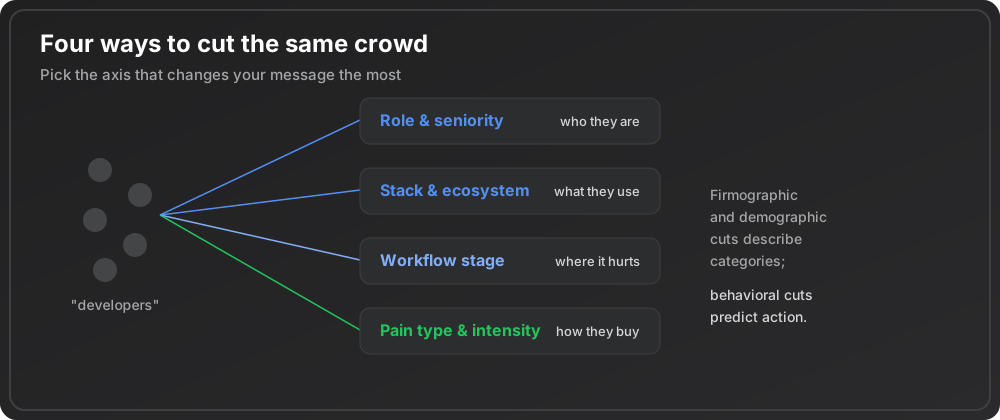
Framework 1: firmographic (who they work for)
Firmographic segmentation cuts by the shape of the organization: solo builder, small startup, scale-up, or enterprise. It matters because company size decides budget, buying process, and tolerance for rough edges. A solo developer buys with a credit card in ninety seconds; an enterprise buyer needs a security review and six signatures.
You can approximate firmographic breadth from signal data without asking anyone. When a pattern shows up across a very large number of independent projects, it is a horizontal pain that spans every company size. “Enhancements Needed for README Documentation” carries a score of 87.5 across a volume of 223, and the owner column tells you the rest.
| Signal | Distinct owners | The segment it points at |
|---|---|---|
| Enhancements Needed for README Documentation | 121 | ✓ Horizontal: solo maintainers and large teams alike, so it can be positioned broadly |
| StaleBot Auto-Close Functionality | 4 | ~ Concentrated: teams large enough to drown in stale issues |
A pain as narrow as the second one belongs to a specific firmographic slice, and your messaging should name that slice explicitly rather than pretend it is universal.
The owner count is the cheapest firmographic proxy you have. High owner counts point to horizontal segments; low owner counts, especially with a rising trend, point to a concentrated segment worth naming precisely. Our guide on how to find underserved developer niches uses the same breadth reading from the opposite direction, to spot the narrow slices before anyone else does.
Framework 2: role and seniority (what they do all day)
Two developers at the same company can be entirely different customers. The Stack Overflow Developer Survey consistently shows the population splitting across back-end, front-end, full-stack, DevOps, and mobile roles, each with distinct tools and pain (Stack Overflow Developer Survey 2025). Role is often a sharper cut than company size, because the daily job decides which problems even register.
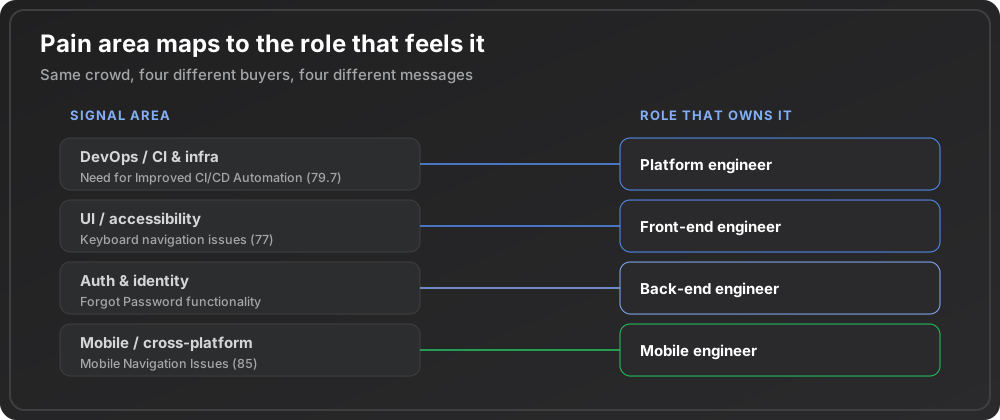
Signal data carries a rough role fingerprint in its macro-area labels. “Need for Improved CI/CD Automation” (score 79.7, across 30 owners) is a platform and DevOps concern; the person who feels it owns pipelines, not pixels. “Accessibility issues with keyboard navigation” (score 77) and “Login form validation failures” land on front-end and full-stack engineers. “Implement ‘Forgot Password’ Functionality” sits in the auth and identity area, which is a back-end or full-stack job. Same crowd, three different buyers, three different messages. A tool that fixes CI pain should never lead with copy about form validation, because the DevOps engineer who owns the pipeline does not care and will bounce.
Seniority layers on top of role. Juniors want tutorials and defaults; seniors want escape hatches and control; leads want governance and a story they can take to their manager. The same feature gets three different headlines depending on which seniority you are cutting for.
Framework 3: stack and workflow stage (where the pain sits)
The third cut ignores who the developer is and looks at where in the workflow the pain occurs. Every macro-area in a signal feed is really a stage in the software lifecycle: writing code, running CI, shipping UI, handling auth, going mobile. Segmenting by stage tells you where in a developer’s day your product has to insert itself, which is a positioning decision as much as a technical one.
Stack is the close cousin of stage. “Mobile Navigation Issues and Usability Challenges” (score 85, across 43 owners) belongs to the mobile and cross-platform stack; the people who feel it are choosing between native and cross-platform frameworks and will not respond to a web-first pitch. A pain rooted in a specific stack pre-qualifies its audience: you already know their tooling, their constraints, and their vocabulary, which makes the message almost write itself.
The reason stage and stack matter for messaging is that developers trust specificity. A pitch that names the exact point in their workflow where the pain bites reads as written by someone who has felt it. A generic pitch reads as marketing. Our tips for market research hub covers how to gather that stage-level detail systematically instead of guessing at it.
Framework 4: pain type and intensity (how they buy)
The frameworks so far are firmographic and demographic: they describe who the developer is. The most useful cut is often behavioral: it describes how they act. Pain type is a clean behavioral axis, and signal data tags every pattern with one.
| Pain type on the cluster | What it is | How it sells |
|---|---|---|
| bug | ✓ A blocker: something broken right now | ✓ Today, because the developer will pay to make it stop |
| feature_request | ~ Aspirational: it improves a workflow that already functions | ~ On a roadmap timeline, against every other nice-to-have |
| complaint | ✗ Friction that quietly erodes retention and word of mouth | ✗ Not a purchase trigger on its own |
“Lack of Rate Limiting on API Endpoints” (score 84.6, across 45 owners) is tagged as a complaint: broad, real, and corrosive, but not a purchase trigger by itself. Read the type and you have read the buying behavior.
Intensity refines the type. A fast-rising signal marks a segment whose pain is getting worse, which means urgency and openness to a new tool. “StaleBot Auto-Close Functionality” shows a growth ratio of 4, a small pool heating up fast. That combination, narrow but accelerating, is a behavioral segment worth reaching early, before the pain becomes obvious enough that everyone builds for it. Sizing that urgency properly is the job covered in how to measure demand for a SaaS idea, which pairs naturally with this behavioral cut.
Firmographic versus behavioral, and how to combine
Firmographic and demographic cuts (company size, role, stack) are easy to observe and easy to act on, which is why most teams stop there. But they describe categories, not behavior, and two developers in the same category can still buy for opposite reasons. Behavioral cuts (pain type, urgency, how they discover tools) predict action better, but they are harder to see without data on what people actually do.
Layer one behavioral axis on one firmographic axis
"Solo developers with an accelerating CI pain" is far more actionable than either half alone. The firmographic half tells you how to price and where to reach them. The behavioral half tells you what to say and how urgent to make it.
Paul Graham’s advice to recruit your earliest users by hand works precisely because it forces this narrow, layered definition of exactly who you are chasing first (Paul Graham on doing things that don’t scale). You cannot hand-recruit a segment you have not defined.
Turning a segment into a message
A segment is only worth cutting if it changes what you write, and the first thing that changes is your value proposition for that developer audience, since a segment-specific claim is the clearest test of whether the cut was sharp enough. Once you have picked one, the test is simple.
The headline test
Could a member of that segment read your headline and think "this is for me, not for developers in general"? If the answer is no, the cut was too coarse. Name the role, the stack, the stage or the specific pain in the first line. Vagueness is the tax you pay for skipping segmentation.
The frameworks are not exclusive. You will usually run two or three cuts against the same audience and keep whichever produces the sharpest, most reachable group. A pain that is broad on breadth but narrow on stack, or narrow on owners but accelerating on trend, is telling you where the seam is. The connective tissue across all of this is the same evidence base described in developer pain points for 2026: you segment on real behavior, not on personas you invented in a meeting.
Cutting a developer audience by hand means reading hundreds of issues, questions, and threads and mentally tagging each one by role, stack, stage, and pain type. That tagging is exactly what EchoSift does automatically. It ingests developer complaints from GitHub, Stack Overflow, Hacker News, and Bluesky, clusters them into recurring patterns, and attaches a macro-area, a pain type, a growth trend, and the number of independent project owners to every cluster, so the seams you would segment along are columns you read instead of a census you run by hand.
This article was drafted with AI assistance and reviewed against EchoSift’s proprietary signal data before publishing.