What Is an MCP Server? Meaning, Examples, and the Parts the Spec Leaves Out
An MCP server exposes tools, resources and prompts to AI agents over one protocol. What that means in practice, real examples you can run today, and what operating one teaches.
 Alessio Persico Founder of EchoSift



An MCP server is a program that exposes a set of capabilities to an AI application over the Model Context Protocol, so that the application’s model can discover and use them at runtime instead of having them wired in ahead of time. Those capabilities come in three kinds: tools the model can call, resources it can read for context, and prompts a user can invoke as templates. The problem it solves is combinatorial. Before a shared protocol, every AI application built a private integration with every system it wanted to reach, so ten applications and ten systems meant a hundred separate pieces of glue with a hundred different maintainers. With MCP, a server describes what it can do once, any compliant client asks for that description, and the same server works in every client that speaks the protocol.
The word “server” causes half of the remaining confusion. It suggests something remote, always on, with a domain name. In practice an MCP server is very often a local process that your editor starts as a subprocess and kills when you close the window, talking over standard input and output. Where it runs is a deployment decision. What makes it a server is that it answers requests in the protocol’s format and advertises what it can do.
We operate one of these in production, at mcp.echosift.io, with a toolset that agents call daily. Most of what follows you can check against the specification yourself, and you should. The last section you cannot: it is the set of things that only show up once real agents are connecting to something you maintain.
What an MCP server exposes
The architecture overview defines three server primitives, and the distinction between them is about who decides to use them.
Tools are executable functions the model chooses to invoke: query a database, open a file, search an index. The model reads the tool’s name, description and JSON Schema, then decides. This is where nearly all the value and nearly all the risk sits.
Resources are data the client can read as context, addressed by URI. A database schema, a config file, a document. The application decides what to pull in, not the model.
Prompts are reusable templates a user picks deliberately, the way a slash command works. They shape a whole interaction rather than answering one question inside it.
The protocol also defines what a client can offer back to the server. That list got shorter in the current revision: elicitation, where a server asks the user for more information or a confirmation, is the one that remains current. Sampling, which let a server borrow the client’s model, and logging were both deprecated as of protocol version 2026-07-28, with new implementations pointed at LLM provider APIs and at stderr or OpenTelemetry instead.
Check the revision before you trust a tutorial
MCP moves quickly and blog posts do not. The 2026-07-28 revision made the protocol stateless, with every request carrying its version and capabilities in a _meta field and a server/discover request replacing the older connection-scoped initialize handshake. Plenty of published examples, including working servers, still describe the older model. Read the version number on the page before you copy the code.
How a client connects: the two transports
The specification defines exactly two standard transports, and the choice between them is mostly a question of where the data lives.
Stdio is the local one. The client launches your server as a subprocess and they exchange newline-delimited JSON-RPC messages over stdin and stdout. There is no network, no port, no authentication layer, because the client already had the right to run the process. The trap is small and famous: anything your server prints to stdout that is not a protocol message corrupts the stream, so all logging goes to stderr.
Streamable HTTP is the remote one. The server provides a single endpoint that handles both POST and GET, replies either with a JSON object or with a request-scoped SSE stream, and can serve many clients at once. This is the transport you want if the data is yours rather than the user’s, and it is the one that drags authorization into your life.
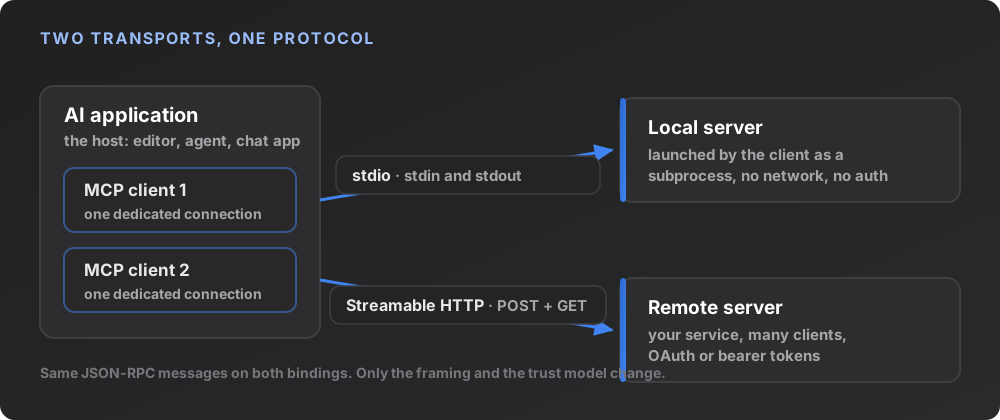
The older HTTP with SSE transport from the 2024-11-05 revision has been replaced by Streamable HTTP, which is worth knowing because a fair amount of tooling and documentation still references it.
| Transport | Who starts the server | Auth | Fits |
|---|---|---|---|
| Stdio | The client, as a subprocess | None, process-level trust | Local files, local git, anything on the user's machine |
| Streamable HTTP | You do, as a service | OAuth or bearer tokens | Your own hosted data, many users, one deployment |
MCP server examples
The fastest way to understand the shape is to run one. These all exist today and are widely used.
The MCP project’s own reference servers are the canonical starting point: Filesystem for reading and writing inside allowed directories, Git for reading and searching repositories, plus Fetch, Memory, Time and Sequential Thinking. They are small on purpose, and reading the Filesystem source is a faster education than any tutorial, because the interesting part of that server is the path validation rather than the protocol handling.
Beyond the reference set, the servers people actually keep connected tend to be maintained by the vendor whose system they wrap. GitHub’s official server exposes repositories, issues, pull requests, Actions and code scanning, and runs either locally from a container image or remotely at api.githubcopilot.com/mcp/ behind OAuth. Microsoft’s Playwright server drives a browser through Playwright’s accessibility tree instead of screenshots, so no vision model is involved and the agent works from structured data.
| Server | What it exposes | Where it runs | Maintained by |
|---|---|---|---|
| Filesystem | File reads and writes inside allowed directories | Local subprocess | The MCP project |
| Git | Repository read, search and history | Local subprocess | The MCP project |
| GitHub | Issues, pull requests, Actions, code scanning | Local container or hosted | GitHub |
| Playwright | Browser control via the accessibility tree | Local subprocess | Microsoft |
| EchoSift | Read-only queries over clustered developer complaints | Hosted, Streamable HTTP | Us |
One correction worth making, because it recurs in example lists: the Postgres reference server is archived. It now lives in the project’s servers-archived repository and is not maintained. Several good third-party Postgres servers exist, and they are worth using, but calling any of them official is wrong and the distinction matters when you are deciding what to depend on.
What ours does, plainly
EchoSift ingests developer complaints from GitHub issues, Stack Overflow questions, Hacker News threads and Bluesky posts, clusters them into recurring patterns, and counts how many distinct owners sit behind each one. The MCP server puts that dataset behind tools like search_signals, trending_signals, get_pain_signal, get_signal_evidence and get_brief (the full, current list lives in the tools reference). It also ships a small set of prompts and, deliberately, zero resources.
A concrete call makes the shape obvious. Ask search_signals about API rate limiting on the 6 August 2026 pass and the top result is the cluster Missing Rate Limiting in API Endpoints, scoring 86.9, with 95 mentions from 56 distinct owners. The agent gets the count of separate owners because that is the number that separates one loud maintainer from a market, and it can then call get_signal_evidence for the underlying quotes and permalinks. It is the same reading a founder would do by hand when hunting for developer tool opportunities, with the manual part removed.
What running one teaches that the spec does not
The specification tells you how to speak the protocol. It says very little about the decisions that determine whether an agent connected to your server produces something useful. These are the ones that cost us real time.
The first request is supposed to fail. An unauthenticated call to our endpoint returns 401 with a WWW-Authenticate header carrying a resource_metadata URL, and that 401 is not an error condition, it is the handshake. The client reads the pointer, fetches the protected-resource metadata, discovers the authorization server, registers itself dynamically, and sends the user through a browser login. If you think of the 401 as a failure and swallow it, you break discovery for every client. We support OAuth 2.1 with PKCE and dynamic client registration for exactly this reason, plus an API key path for headless use.
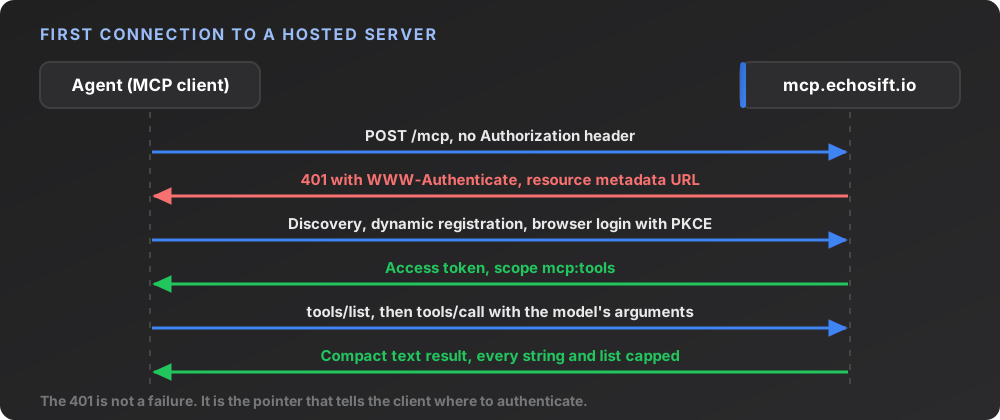
Tool output is a rendering decision, and it is the most consequential one you make. Our REST API returns DTOs shaped for a React front end: pagination cursors, ISO timestamps, enum codes, raw growth ratios, identifiers inline. Returning that JSON verbatim from a tool technically works and produces bad agents, because the model spends its context on plumbing and then hallucinates around the parts it misreads. We render tool results as compact text written for a model rather than for a browser, with the internal identifier explicitly labelled as a handle to pass to the next tool and not something to show the user. That single note removed a whole class of agent behaviour where the assistant would recite database identifiers at a founder.
Where a straight JSON dump fails
The model reads every byte you return. A paginated DTO with cursors, enum codes and timestamps spends context on structure that carries no meaning for the reader, and the useful field ends up competing with twenty that are not. Shape the response for the consumer, which is a language model, not a component.
Everything gets truncated, and not for cost reasons. Our evidence tool caps each quote and caps the number of items returned. The reason is that tool output is untrusted text going directly into a model’s context, which makes it both a context-flooding risk and a prompt-injection surface. A single long issue comment can carry instructions aimed at the agent. Truncation is not a nicety you add later.
Errors have to come back as results. When an upstream call fails, we return a normal tool result carrying the message with the error flag set, rather than throwing. An exception surfaces as a protocol error and the agent’s turn falls over. A result the model can read tells it the rate limit was hit and it should wait, and it recovers on its own.
Read-only annotations are hints, not enforcement. Our signal tools carry read-only annotations, and those annotations are hints to the client, not enforcement. The actual guarantee comes from the credential the server passes upstream having no write scope. Treat the annotations as documentation for the model, and put the enforcement where it cannot be bypassed.
Your SDK, not the spec, decides which revision you speak. Ours pins a version whose newest supported protocol revision is 2025-11-25, while the specification is at 2026-07-28. That is normal and the protocol negotiates it, but it means “we support MCP” is an incomplete sentence. Check what your SDK actually implements before promising a client anything.
Decide what the model may do
Write the tool list before any code. Every tool the model can see is a decision it can make badly.
Pick the transport from the data
User's machine means stdio. Your hosted data means Streamable HTTP, and that pulls in auth.
Write the descriptions last and carefully
The description is the whole interface. The model picks a tool by reading it, so ambiguity there looks like a broken tool.
Render for a model, not a browser
Compact text, no plumbing, internal identifiers marked as handles.
Cap every string and every list
Before launch, not after the first agent pastes a 40kb comment into its own context.
When an MCP server is the wrong shape
Not everything wants to be one. If the capability is a single deterministic step that always runs the same way, a script is simpler and cheaper to reason about. If the data changes so fast that a cached tool list would be wrong, you are fighting the discovery model. And if your tool surface is large, ambiguous and overlapping, adding it to an agent makes the agent worse: models pick badly among fifty similar options, and every tool description you ship is competing for attention with the rest of the context.
The shape MCP fits is a bounded set of clearly distinct capabilities over data the model cannot otherwise reach. That is why file access, repository access, browser control and specialised datasets are the categories that stuck, and it is a useful filter when looking for underserved developer niches of your own.
Where the model pays off
A server earns its place when the agent can answer a question it could not answer before, in one or two calls, using data the model has never seen. Everything else is a wrapper around an API the user could have called themselves.
The short version
An MCP server is a small, well-described program that lets an AI application borrow capabilities it does not have. Three primitives, two transports, one JSON-RPC protocol, and a specification that is readable in an afternoon. Building one is not hard. Building one that makes an agent measurably better is a different job, and it comes down to choices the specification leaves entirely to you: what you let the model do, what you send back, and how much of it. Start from the reference servers, read the current revision rather than a tutorial, and decide your tool list before you write a line, because that list is the product.
If you want to see what a working server looks like from the client side, ours is a browser login away, and the underlying method of counting distinct owners behind a complaint is written up in how to validate a SaaS idea.
This article was drafted with AI assistance and reviewed against EchoSift’s proprietary signal data before publishing. All signal figures are live aggregates from EchoSift’s feed as of the 2026-08-06 snapshot, and all protocol details were checked against the 2026-07-28 specification on the same day.