Business Chat Programs: A Builder's Lens on the 2026 Landscape
A builder's lens on business chat programs in 2026. API maturity, rate-limit shape, idempotency, pricing DNA, and a decision tree by use case.
 Alessio Persico Founder of EchoSift


Twenty-six mentions from 9 distinct project owners, all naming the same gap: no reliable way to track background agents across a chat surface. That signal is a precise example of the questions a builder has to answer before picking a business chat program, and it appears in no standard comparison grid. Published comparisons are written for the buyer choosing software, not the builder wiring it into a product. The buyer wants features, prices, ratings, and the obligatory mention of integrations. The builder needs to know which API will actually behave during a 3 a.m. webhook storm, which rate-limit shape lets a background agent post without throttling, which pricing model gets cheaper as the product succeeds rather than more expensive, and which vendor’s documentation tells you the truth about message ordering when the network is bad.
The gap between those two perspectives is wider than most articles acknowledge. A program that looks identical in a side-by-side feature table can produce a completely different experience for the team that has to operate it for two years.
What the comparison grid will not tell you
The vendor whose pricing page boasts "unlimited messages" may meter you on something else. The vendor with a beautiful homepage may have a webhook delivery contract that quietly drops events past a certain queue depth. None of this surfaces in a marketing comparison.
We hit this exact wall while building EchoSift. We needed a way to receive structured events from our own pipeline into a team-comm surface and at the same time push customer-facing updates into an embedded surface, and we discovered that the two requirements pointed at completely different vendors despite both being labelled “business chat programs” by the market. The framing in this piece is the one we converged on after that work. It is a builder’s lens: a list of the questions a technical evaluator should ask, the patterns those answers fall into, and a decision tree that maps a use case to a category of vendor rather than to a brand.
The rest of the article is structured as the evaluation we wish we had been handed. It starts with what the phrase actually means in 2026, walks through a five-item checklist any chat API should pass, names the places where the maturity gap between vendors shows up most concretely, looks at the new dimension agents have introduced, decodes what pricing models reveal about a vendor’s product DNA, and closes with a short decision tree by use case. None of it is a feature ranking. The goal is to give you a reading lens that survives the next three product cycles.
Table of Contents
- What business chat programs actually means in 2026
- The builder’s checklist for a chat API
- Where the API maturity gap shows up between vendors
- Chat as the surface for AI agents
- Pricing models and what they reveal
- What developer support teams actually need
- A decision tree by use case
- Putting it together for 2026
What business chat programs actually means in 2026
“Business chat programs” is a market label that hides at least four distinct product categories that share almost nothing under the surface. Treating them as one category is the most common reason builders end up with a tool that does the wrong job competently.
| Category | Optimises for | The API assumes | Unit of value |
|---|---|---|---|
| Team communication | Persistent human presence inside long-lived channels | You are building bots, notifications and slash commands that join human conversations | The daily active human, priced per seat |
| Customer conversation | Inbound from people outside the organisation | A CRM or product database backs the conversation, with segmentation and campaigns attached | The monthly active end user |
| Embedded chat | Your users talking inside your own product | SDK-first: you provide the UI, your backend already knows who your users are | Mixed, active users plus message volume |
| Programmatic messaging | Delivered events, where the sender is often a machine | API-first, machine to human or machine to machine | The delivered message |
The archetypal vendors sort cleanly into those rows. Team-comm is Slack, Microsoft Teams, Discord for the technical-community flavour, Mattermost and Rocket.Chat when self-hosting is a requirement. Customer-comm is Intercom, Front, Crisp, Drift and HelpScout, increasingly with an AI chatbot layer on top, which is where the vendor’s choice of natural language processing API starts to leak into your evaluation. Embedded chat is Stream, Sendbird, TalkJS and the chat layer inside Twilio’s Conversations API. Programmatic messaging is Twilio’s core platform, Vonage, MessageBird, Pusher and the SMS-or-WhatsApp side of the conversation, which is also the cheapest substrate for high-volume agent traffic.
The categories overlap at the edges. Twilio sells Conversations on top of its programmatic substrate. Microsoft Teams now exposes a customer-comm surface through workflow apps and the Bot Framework. Slack’s bot ecosystem has begun to look a lot like embedded chat for some integrations. But the underlying DNA of each vendor still shows through in the API shape, and recognising the DNA is the single most useful skill when reading a chat-program landing page.
Practical rule: before you compare two business chat programs, decide which of these four categories you are buying. A comparison across categories is almost always a category error wearing a feature table, and it produces a tool that does the wrong job competently.
The builder’s checklist for a chat API
Once you know which category you are evaluating, the questions a builder should ask are the same across all four. The checklist below is five items long. It is not exhaustive on purpose. Each item maps to a known cause of production pain you will hit if you skip it, which is why none of them can be reasonably skipped.
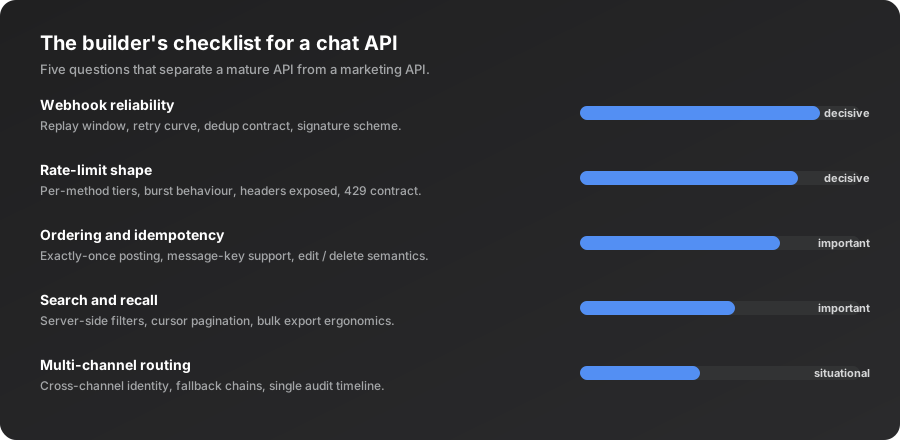
| Contract | What a vendor offering it looks like | What its absence costs you |
|---|---|---|
| Webhook reliability | A 24-hour replay window, exponential backoff, an HMAC signature header | ✓ A contract that survives an outage |
| Rate-limit shape | Documented tiers, a 429, a Retry-After header you can trust | ✗ Guesswork, so you run well below the allowed throughput |
| Ordering and idempotency | A stable key per logical operation, deduplicated, replay returns the original result | ✗ No retry is ever safe |
| Search and recall | Server-side filters with cursor pagination | ✗ Weeks spent building a client-side index |
| Multi-channel routing | A cross-channel identity table, fallback chains, one audit timeline | ✗ A fragile pipeline that hardens into a migration |
Two of those have public reference implementations worth reading before you evaluate anyone. Slack’s published rate-limit tiers show how a mature vendor exposes limit shape: four tiers, a documented 429 response, and a Retry-After header that tells your app exactly how long to wait. For idempotency, Stripe’s foundational essay is still the cleanest articulation of why a unique key per logical operation matters at a system level, and it is the bar a serious chat API should clear.
Two of the five deserve a warning about how they fail. The replay window is the most undersold number on vendor landing pages and the one most likely to wake you up at night when it turns out to be too short. Multi-channel routing looks irrelevant when you have a single channel today, yet the temptation to add email, SMS or a second team-comm tool arrives eventually, and the cost of switching vendors after the message history has accumulated is high.
Practical rule: time the documentation rather than the demo. If a vendor’s docs cannot answer all five of these questions in under thirty minutes of reading, treat it as a yellow flag and budget twice as long for the integration as you first estimated.
Where the API maturity gap shows up between vendors
The five-item checklist is also the lens that surfaces the maturity gap between vendors who look similar from outside. The places where the gap is loudest in 2026 are predictable.
| Gap | What a mature vendor ships | What a maturing vendor ships |
|---|---|---|
| Webhook security | HMAC over the body with a vendor-issued secret, a signature header, a timestamp check that rejects replays | ✗ No timestamp check, or verification against an unauthenticated identifier |
| Rate-limit headers | Per-route buckets exposing limit, remaining, reset, plus a bucket identifier | ✗ A bare 429, so the whole surface has to be treated as one fragile pool |
| Webhook fan-out | N registered URLs, a queue and an explicit replay UI | ✗ One event to one URL, and you build the relay yourself |
| Message ordering | A server-side timestamp you can trust, or one you supply | ✗ Neither, so the order has to be encoded in the message body |
| Bulk export | One paginated endpoint, ideally JSON and a streaming format | ✗ A CSV export in the admin UI with a daily quota |
Three vendors document the mature end of that table well enough to use as a baseline. Twilio’s webhook signature security spec shows an HMAC-SHA1 signature over the full request URL combined with the form parameters, delivered in the X-Twilio-Signature header and validated against the account auth token. Discord’s per-route bucket model exposes X-RateLimit-Bucket as a hashed identifier you can use to group shared limits. Microsoft’s Teams story shows a third pattern again, where the choice between an Incoming Webhook, an Outgoing Webhook and the Bot Framework maps onto whether you need a one-way post, a request-response listener, or a persistent app surface.
Two of these gaps sound esoteric right up until they are not. Message ordering matters the first time you operate a flow where two confirmations have to land in sequence to keep a workflow correct. Bulk export matters the first time compliance, analytics or a migration asks for every message in a channel across a date range, and the difference between the two rows above is the difference between a one-hour script and a one-week project.
The cheapest audit is a documentation crawl
Vendors with a clean API maturity story show it on their documentation page within the first three clicks. Vendors still maturing bury those pages or omit them. Five minutes of crawling predicts the integration experience better than any feature comparison.
Chat as the surface for AI agents
The newest dimension in the business-chat-program landscape, and the one most builders are underestimating, is that chat has quietly become the de facto user interface for AI agents. A year ago the relevant question was “does this product have a chatbot mode”. In 2026 the question is whether your chat program can host agents that work asynchronously for minutes or hours and report back when they are done.
This shift changes the evaluation criteria. An agent that runs in the background does not need rich UI surface area; it needs reliable task identity, durable notifications, and a way to be interrogated while it is still running. The chat program that hosts it becomes a task surface as much as a conversation surface. Vendors who have grasped this are exposing thread-as-task primitives, durable state per thread, and notification semantics that survive a client refresh. Vendors who have not are still treating threads as ephemeral conversational state.
Our own pipeline put a number on how widely that gap is felt. We tracked complaints about background-agent notifications and task management as a single cluster over the 30 days ending 7 June 2026.
The complaint underneath those 26 mentions is consistent: agents are running in background contexts and there is no shared way to know which agent is doing what, how long it has been running, or whether it has finished. The pattern is cross-vendor, though the terminology is still being negotiated and the signal can change shape quickly as vendors converge on naming conventions. The implication for chat-program selection is concrete. The surface that wins here will need to behave less like a Slack channel and more like a process inspector.
Source: EchoSift internal signal data, 2026-05-09 to 2026-06-07, 26 mentions across 9 GitHub project owners.
The practical effect on a 2026 evaluation is that your chat program needs to answer three new questions in addition to the five-item checklist above.
Can an agent claim a thread as a task?
The API has to let a thread be a long-lived unit of work with status updates, not a conversation that happens to have a bot in it.
Does thread metadata survive and stay queryable?
Structured metadata attached to a thread has to outlive a client reload and be retrievable by query, not just rendered.
What happens to a thread silent for an hour?
An agent mid-work produces exactly that, and a program that treats silence as abandonment will garbage-collect your task surface.
The vendors who answer well on these three points will own the next category transition, and the vendors who do not will quietly become legacy. This is exactly the kind of shift we track in our survey of developer tools opportunities for 2026, where the surfaces that host long-running agents keep showing up as an underbuilt category.
There is a tactical lesson for builders making the choice now. If you are building a product where agents will be a meaningful share of the message volume in the next eighteen months, weight your evaluation toward vendors with strong programmatic-messaging DNA or strong embedded-chat DNA. Team-comm vendors will catch up, but they are starting from a per-seat pricing model and a UI assumption that does not naturally extend to long-running background processes. Embedded and programmatic vendors started from the right end of the problem.
Practical rule: if your roadmap includes background agents, evaluate the chat program by how it handles long-lived silent threads, not by how rich its real-time presence indicators are. Presence is a human feature. Durable task identity is an agent feature, and the two rarely arrive in the same release.
Pricing models and what they reveal
The pricing page of a business chat program tells you more about the product than the features page does. Each pricing model encodes a set of assumptions about who the customer is, how the product is used, and what success looks like from the vendor’s perspective. The three dominant models in 2026 each reveal a different DNA.
| Pricing model | Unit of value | Product DNA | The hidden cost |
|---|---|---|---|
| Per seat | The daily active human | Team-comm | ✗ Every external bot starts to look like a billable seat, so heavy automation costs more than the marketing suggests |
| Per message | The delivered event | Embedded and programmatic | ✗ Chatty agents multiply the bill linearly and can outrun your own unit economics |
| Per MAU | The monthly active end user | Customer-comm | ✗ Success grows the bill with reach, and margin recovery per new user lags by months |
The API surface follows the price. Per-seat vendors assume persistent human presence and channels with long-lived state, which is Slack, Microsoft Teams and most Slack alternatives. Per-message vendors assume machine-to-human or machine-to-machine pipelines and treat throughput as the primary economic axis, which is Twilio’s core platform, Pusher and the per-message tiers of embedded-chat vendors. Per-MAU vendors assume a CRM backing with segmentation and campaigns for reaching cohorts, which is Intercom, Crisp and Front.
Hybrids ask you to predict two cost curves at once
Per-seat plus a per-message overage for bots, or per-MAU plus a "messages sent" overage, are how vendors monetise growth from new customer segments without rewriting their pricing page. They are not categorically bad, but they need modelling rather than a glance. Walk your usage profile through the pricing page in a spreadsheet and look for the cliffs.
There is also a structural lesson worth absorbing. The DNA you pick at procurement time tends to follow you for years. Switching costs on chat programs are high because the message history, the user identities, and the wired-in integrations accumulate weight. Buying the wrong DNA because it had the most attractive landing page is the single most common reason builders end up replatforming two years later. Read the pricing model as a signal of what the vendor will keep optimising for, not as a static number.
What developer support teams actually need
Most articles about business chat programs are written for marketing teams choosing customer-comm tools. That is a real use case, but it is not the use case most builders inherit when they take over the support stack for an engineering-driven product. Developer support teams have a different shopping list, and it is worth naming it because almost no vendor landing page acknowledges it.
Async-first defaults
Engineering customers do not expect a one-minute response and actively dislike a "we'll be right with you" auto-reply. The tooling has to make a forty-minute response look intentional rather than embarrassed.
Audit trails and durable exports
Bulk export, structured message metadata and a permanent message URL, because the transcript is going into Linear, a GitHub issue or a postmortem. Tools that hide messages behind ephemeral channels become a liability.
Threading as a first-class primitive
Developer conversations branch. One ticket easily spawns four sub-threads, and a tool that flattens them into a single feed loses the ability to resolve any of them cleanly.
Bot surfaces that are not bolted on
Rate-limit budgets that include bots, permission models that do not spend a human seat on a bot identity, and auth flows that do not assume a person at the keyboard.
Escalation and handoff
A thread that needs an engineer moves into the issue tracker with full context attached rather than as a copy-paste, which saves days per quarter.
Tools designed around marketing chat push toward fast-acknowledgement UI patterns that read as condescending in a technical context, and tools where the bot API was an afterthought show it in every one of the five rows above. None of it appears on a marketing comparison grid. It appears in the lived experience of the team that uses the tool for a year.
The cheapest way to surface all of it before you commit is to interview someone who has run a developer support team on the tool you are evaluating. The second cheapest is to read that support team’s own complaints in the public communities where engineering people congregate, which is the only place the unvarnished version of these requirements gets written down. Those same complaint threads are a rich source of product ideas in their own right, a technique we walk through in our piece on finding SaaS ideas from GitHub issues.
A decision tree by use case
The four categories of business chat program map to four use cases with reasonable cleanliness. The decision tree below is the shortest framework we use when someone asks us for a recommendation. It compresses the entire article into one diagram.
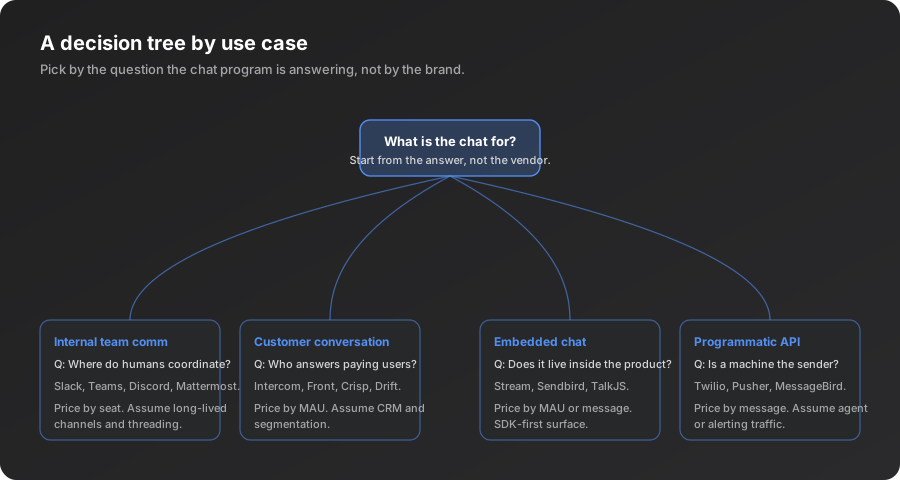
The root question is always the same. What is the chat actually for. The answer should be a single sentence and it should name the people in the conversation. Once that sentence exists, the leaf is usually decided.
| What the chat is for | Shortlist | Weight the evaluation on |
|---|---|---|
| Internal team coordination | Slack, Microsoft Teams, Discord, self-hosted alternatives under a regulatory requirement | Bot surface, threading, integration ecosystem |
| Customer conversation | Intercom, Front, Crisp, Drift, the customer-comm side of Zendesk | CRM integration, segmentation, campaigns, and the cost curve from 5,000 to 50,000 MAU |
| Embedded inside your own product | Stream, Sendbird, TalkJS, the chat layer of Twilio Conversations | SDK ergonomics on your target platforms, server-side moderation, message-history storage |
| Alerts, agent traffic, transactional messages | Twilio, Vonage, MessageBird, the messaging tiers of cloud providers | Rate-limit shape, deliverability by geography, SDK quality in the languages you ship, compliance by jurisdiction |
Two warnings sit inside that table. Resist using the team-comm tool for external customer conversations, because the DNA mismatch catches up with you. And in embedded chat the SDK ergonomics dominate the lived experience, so treat the SDK choice as a multi-year commitment rather than an implementation detail.
The decision tree is not exhaustive. There are hybrid use cases, and there are products that need two tools wired together. But starting from the question rather than from the brand is the discipline that prevents the most common procurement mistake, which is buying a category-mismatched product because it had the most visible advertising or the friend recommendation came from someone in a different category.
Write the sentence before you read a vendor page
If you cannot write a single sentence that names the people in the conversation, you have not finished the requirements phase.
Putting it together for 2026
The 2026 business-chat-program landscape rewards builders who can read a vendor’s API and pricing page like a system, not like a brochure. The four-category taxonomy filters most of the noise. The five-item checklist surfaces the maturity gaps. The agent dimension adds three new questions on top. The pricing-DNA reading frame predicts what the vendor will optimise for next. The decision tree compresses all of that into a single first-question answer.
Two years from now the names on the shortlist will have shifted, the agent dimension will be table-stakes, and a category we have not named yet will be visible.
Why the lenses outlast the vendors
None of these tools is a feature ranking. Vendors will keep launching features, repricing and rebranding, and the lenses keep working because they read underlying DNA. Starting from the use case and the unit of value will still cut the noise faster than any feature comparison.
If you are building for developers and you want to spot the pain shifts in the chat-program landscape, or any other developer category, before they show up on competitor landing pages, EchoSift is the tool we use ourselves. It surfaces rising complaints across the places engineers actually congregate (GitHub, Stack Overflow, Hacker News, Bluesky, and Reddit) and clusters them into pain patterns you can act on. The same lens that helped us see the agent-as-chat-surface shift a quarter early is what we built into the product. If the next chat-program category transition matters to your roadmap, that is the lens we would recommend.
This article was drafted with AI assistance and reviewed against EchoSift’s proprietary signal data before publishing.